> ## Documentation Index
> Fetch the complete documentation index at: https://docs.niro.cx/llms.txt
> Use this file to discover all available pages before exploring further.

# Introduction

> Niro is an AI SRE platform for Kubernetes and k3s fleets: realtime visibility, guided troubleshooting, and Git-backed remediation.

## AI SRE for Kubernetes and k3s fleets

Niro gives platform teams, homelab operators, MSPs, and edge teams one secure workspace for cluster health, workload status, logs, metrics, deployments, incident context, and Git-backed remediation.

Connect a cluster with a lightweight in-cluster agent. The agent calls home over outbound HTTPS, so Niro works behind NAT, customer firewalls, and edge networks without public cluster ports, VPNs, or inbound access.

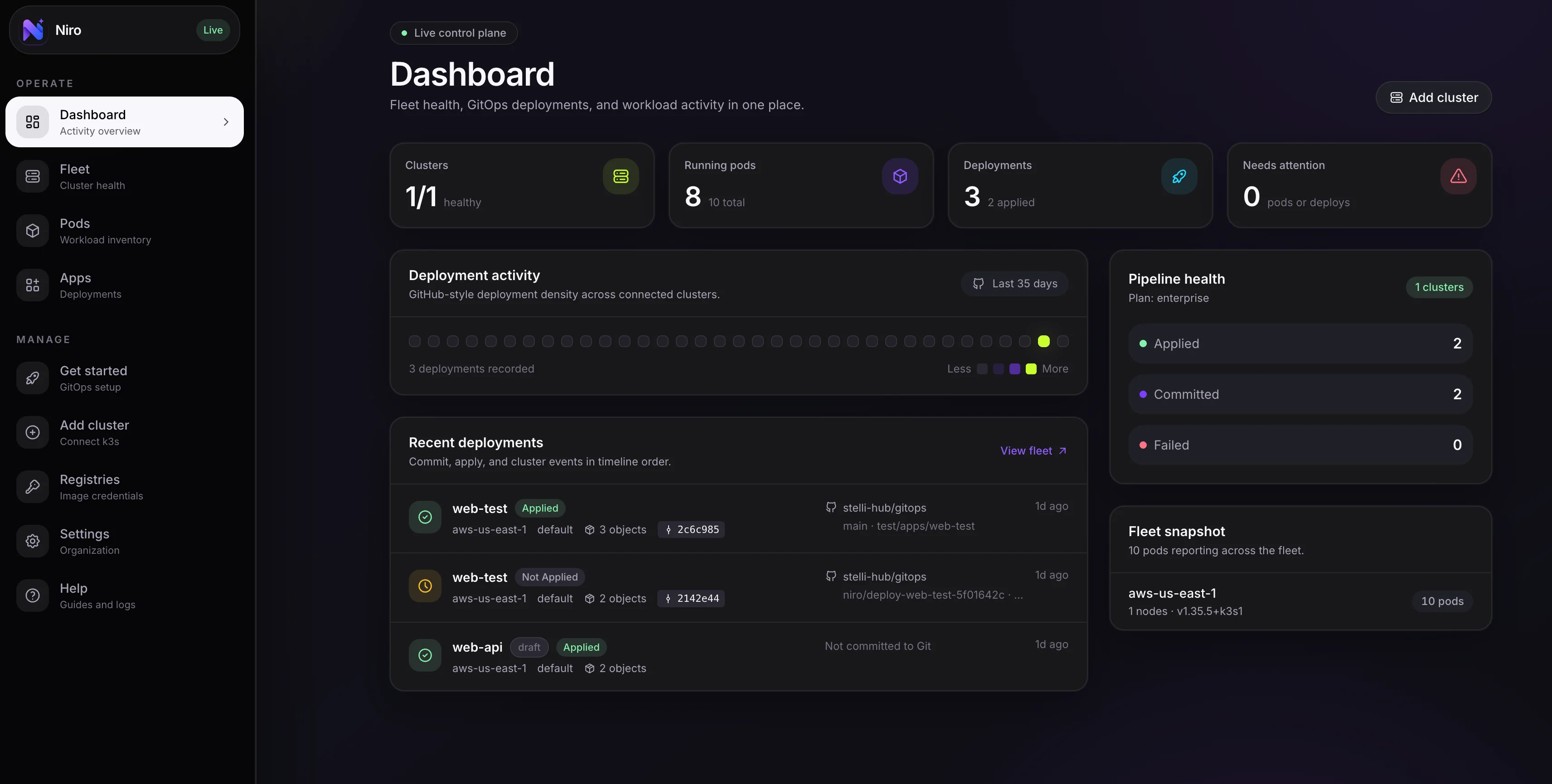
<Frame caption="Realtime health, incidents, deployments, and remediation in one Niro console.">
  <img src="https://mintcdn.com/niro/ujAs6O33ScMqRsAr/images/dashboard.png?fit=max&auto=format&n=ujAs6O33ScMqRsAr&q=85&s=d274b339a9b8eca214503269e9061c2a" alt="Niro dashboard showing cluster health, incident status, deployment metrics, and GitOps remediation" width="3424" height="1730" data-path="images/dashboard.png" />
</Frame>

<CardGroup cols={2}>
  <Card title="Free starter" icon="seedling" color="#7C3CFF">
    Connect your first cluster and validate visibility without a credit card.
  </Card>

  <Card title="60s enrollment" icon="bolt" color="#8F5CFF">
    Install the agent with one command and see heartbeats in the dashboard.
  </Card>

  <Card title="Realtime context" icon="gauge" color="#9A6BFF">
    Track pods, nodes, incidents, events, logs, and deployment history together.
  </Card>

  <Card title="Zero inbound ports" icon="shield-check" color="#7C3CFF">
    Keep clusters private while still giving teams operational visibility.
  </Card>
</CardGroup>

## What Niro helps you do

<CardGroup cols={2}>
  <Card title="Kubernetes command center" icon="server" color="#7C3CFF" href="/guides/fleet-monitoring">
    Understand cluster health, workload activity, resource pressure, and change history across connected environments.
  </Card>

  <Card title="Troubleshoot in context" icon="terminal" color="#8F5CFF" href="/features/ai-investigation">
    Move from failing pods to logs, events, metrics, manifests, and AI-assisted root-cause analysis without losing the incident thread.
  </Card>

  <Card title="Remediate through Git" icon="code-branch" color="#9A6BFF" href="/guides/gitops">
    Review manifest risk, keep approval in pull requests, and apply only the approved state to the cluster.
  </Card>

  <Card title="Deploy without YAML" icon="wand-magic-sparkles" color="#7C3CFF" href="/features/visual-builder">
    Use the visual builder to turn application settings into reviewable Kubernetes manifests.
  </Card>

  <Card title="Control capabilities" icon="lock" color="#8F5CFF" href="/reference/agent-capabilities">
    Start read-only, then explicitly enable logs, manifests, or apply when a cluster owner chooses.
  </Card>

  <Card title="Operate across orgs" icon="building" color="#9A6BFF" href="/features/multi-tenancy">
    Separate customers, organizations, and environments while keeping each view scoped to the signed-in engineer.
  </Card>

  <Card title="Approval-gated remediations" icon="heart-rate-monitor" color="#7C3CFF" href="/features/remediations">
    Act on AI-suggested fixes with a single click — every action requires explicit approval and is logged.
  </Card>

  <Card title="Cost and rightsizing" icon="coin" color="#8F5CFF" href="/features/cost">
    See requested, used, and wasted cost by cluster and workload, then resize CPU and memory via pull request.
  </Card>

  <Card title="Security posture" icon="shield-check" color="#9A6BFF" href="/features/security-posture">
    Built-in standards checks, OPA Gatekeeper and Kyverno violations, and image vulnerability scanning in one view.
  </Card>

  <Card title="Resource inventory" icon="list-search" color="#7C3CFF" href="/features/resources">
    Browse and search every Kubernetes resource — workloads, services, config, and GitOps resources — across the fleet.
  </Card>
</CardGroup>

## How the platform works

<div className="grid grid-cols-1 gap-4 md:grid-cols-2">
  <Card title="1. Agent calls home" icon="radio" color="#7C3CFF">
    The agent runs inside each cluster and sends heartbeats, inventory, warning events, and capability status to Niro.
  </Card>

  <Card title="2. Niro builds context" icon="layer-group" color="#8F5CFF">
    Niro correlates cluster state, incident signals, deployments, policy findings, and GitHub activity.
  </Card>

  <div className="md:col-span-2">
    <Card title="3. Teams act safely" icon="code-branch" color="#9A6BFF">
      Engineers investigate in the dashboard, review fixes through Git, and apply approved changes through scoped agent capabilities.
    </Card>
  </div>
</div>

<Note>
  Niro never requires inbound cluster access. All communication starts from the cluster over HTTPS, then commands return over the agent's existing connection.
</Note>

## Start here

<CardGroup cols={2}>
  <Card title="Quickstart" icon="play" href="/quickstart" color="#7C3CFF">
    Connect your first cluster and deploy an app in under 5 minutes.
  </Card>

  <Card title="Core concepts" icon="lightbulb" href="/concepts/overview" color="#8F5CFF">
    Understand clusters, agents, deployments, and environments.
  </Card>

  <Card title="Deploy an app" icon="rocket" href="/guides/deploy-app" color="#9A6BFF">
    Use the visual builder to ship a workload without writing YAML.
  </Card>

  <Card title="Set up GitOps" icon="code-branch" href="/guides/gitops" color="#7C3CFF">
    Link GitHub for PR-based remediation with AI manifest review.
  </Card>
</CardGroup>
